Chapter 7 Applying an exchange rate
APPLYING AN EXCHANGE RATE
If the Currency Exchange module is enabled in the OPERATIONAL BEHAVIOR section of ADMINISTRATIVE SETTINGS, the exchange rate tools will be displayed.
If you update the exchange rate register (see below), you will be able to select your preferred currency to view the current exchange rate.
Three tools are available for applying an exchange rate.
TOOL 1:  This tool converts the invoice items by modifying the amounts at the selected rate.
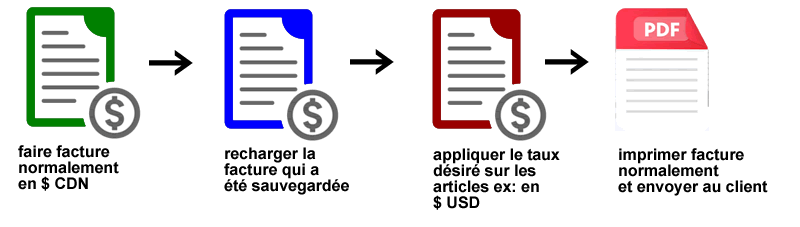
The direct exchange rate application tool is used on an EXISTING INVOICE (therefore NOT ON A NEW, UNSAVED INVOICE) created in Canadian dollars. The invoice is then loaded to apply the desired rate, printed, and sent to the customer.
This tool modifies the prices and adds a comment indicating the selected currency. The SAVE button is removed (to prevent errors), and the PRINT button is available. This tool converts the invoice items by modifying the amounts at the selected rate.
The direct exchange rate application tool is used on an EXISTING INVOICE (therefore NOT ON A NEW, UNSAVED INVOICE) created in Canadian dollars. The invoice is then loaded to apply the desired rate, printed, and sent to the customer.
This tool modifies the prices and adds a comment indicating the selected currency. The SAVE button is removed (to prevent errors), and the PRINT button is available.
TOOL 2:  This tool undoes the conversion from Tool 1 and resets the items to the default price for this customer. This tool undoes the conversion from Tool 1 and resets the items to the default price for this customer.
TOOL 3:  This tool performs a reverse conversion on the invoice items, modifying the amounts at the selected rate.
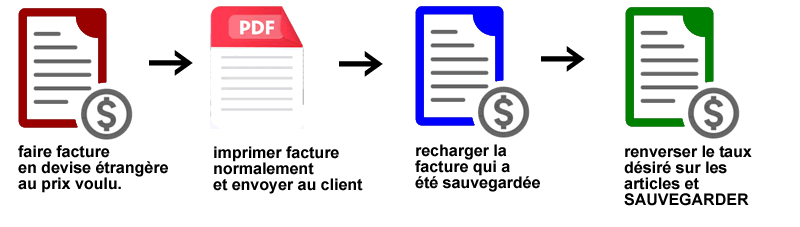
The exchange rate reversal tool is used on an existing invoice (not a new, unsaved invoice) issued in a foreign currency. This invoice is then converted to Canadian dollars and saved.
Normally, this tool is used to rebalance an invoice issued in a foreign currency that has been sent to the customer. It converts the prices to Canadian dollars (thus reversing the chosen exchange rate). This tool performs a reverse conversion on the invoice items, modifying the amounts at the selected rate.
The exchange rate reversal tool is used on an existing invoice (not a new, unsaved invoice) issued in a foreign currency. This invoice is then converted to Canadian dollars and saved.
Normally, this tool is used to rebalance an invoice issued in a foreign currency that has been sent to the customer. It converts the prices to Canadian dollars (thus reversing the chosen exchange rate).
To update the Exchange Rate Register: Go to ADMINISTRATIVE SETTINGS
you will find the EXCHANGE RATES section.
|

|
In this function, you can automatically update the table using the global exchange rate database via the internet.
The system will add any missing rows to the table.
You can manually update the rates and values ??or delete rows from the table if desired.
You can select an expense account to activate the function (ENTER EXCHANGE RATE AMOUNT) either by searching or manually. A debit account is required.
A copy option allows you to copy the account from row 1 to the other rows in the table.
|

|
|
|