One of WEBMINO's advanced features is the ability to send automated emails or text messages.
IMPORTANT:
When WEBMINO sends emails, a signature address is appended to the email before sending. This address is important because it will be examined by the recipient's email server for validation.
When you send emails from your account using your email software or Gmail, for example, it is this email server that sends the email via its SMTP gateway.
When ADMINOPLUS sends the email, it does so via ITS SMTP GATEWAY and not that of your domain's server or Gmail.
For ADMINOPLUS, the default address is automail.adminoplus.com. For WEBMINO, the default address is noreply.webmino.com. These two addresses are the only ones validated and authorized by our email server.
When the recipient's email server verifies the sending address, it communicates with the domain server (e.g., adminoplus.com) to verify the domain's origin.
If you use an address other than the default (e.g., macompagnie.com), this verification will fail if the adminoplus.com domain is not authorized to send emails for the macompagnie.com domain, which is not hosted by the adminoplus.com server.
Your client will either not receive the email or it will end up in their spam folder.
You must therefore ask macompagnie.com, gmail.com, or outlook.com to authorize adminoplus.com to send emails on its behalf.
This is done by accessing the settings of your Gmail, Outlook, or your own domain account. Sometimes you may need to ask your domain technician to perform this task for you.
For WEBMINO, our technicians perform this task for the client. This is part of the service offered for this platform.
For ADMINOPLUS, clients who wish to use their own domain name must perform this task themselves.
The domain to authorize is adminoplus.com or the address 184.107.122.155.

To do this, you must configure a series of formatted documents that will create a more or less personalized message that will accompany the PDF document. A new SEND EMAIL BY LINK ONLY option in Document Management allows you to send an email with a link to the document instead of the document itself as an attachment (lighter emails).
The sections are divided as follows:
- Sales Documents: invoices, orders, quotes, work orders
- Account Statements: customer account statements
- Other Documents: almost all other documents in the system that can be sent by email.
- Employees: all documents sent to employees (payment stubs) Payroll, T4 and Relevé 1 slips, Termination of Employment) which can be sent by email.
- Customer Services Documents 1-2-3: order confirmations(1), ready order confirmation(2), online sales invoices(3)
- Additional Texts 1-2-3-4: region-specific texts associated with certain optional modules.
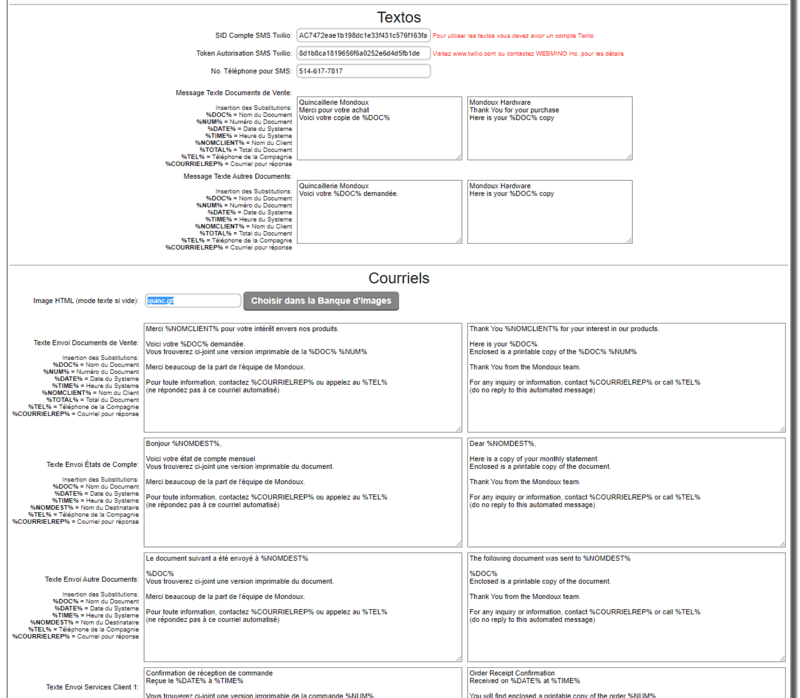
For each section, you can enter relevant text and use SUBSTITUTION MACROS within it. The key is located to the left of each section.
The texting section requires an account and subscription with the company TWILIO to send text messages
To use texting, an account with the provider Twilio must be activated. This is the service that allows messages to be sent via a cellular gateway for Canada and the United States.
The price is approximately $0.008 per message. For $20, that's about 2,500 text messages. Texting is mainly used when two-factor authentication is enabled.
Additional information for sales documents in emails and text messages.

When sending emails with sales documents (invoices, orders, work orders, quotes, etc.), you have a setting in the document configuration itself that allows you to decide whether the document (PDF) is physically attached to the email or not.
If the link option is enabled, a link is added to the email that allows the customer to download the document at their convenience.
In the case of text messages, a text message alone is an SMS; if a PDF is attached, it becomes an MMS and is more expensive because there is more data to transfer.
WEBMINO therefore processes all SMS messages and always includes a link allowing the customer to download the document at their convenience.
An exception exists for an invoice in 40-COLUMN RIBBON mode, which will be incorporated directly into the SMS message or email.
example:
Here is your requested invoice.
Please find attached a printable version of Invoice 1582.
Thank you very much from the Mondoux team.
For any information, contact info@mondoux.com or call (450) 678-6789
(do not reply to this automated email)
Mondoux Hardware Store
1234 Rue De La Madonne
St-Joachin De La Pérade
Quebec
J0T 1K2
(450) 678-6789 (450) 678-9876
INVOICE 1582 2025/01/15 15:37:35
Customer: 00000011
Pelletier, Antoine
1273 Desfaisans
Prevost, QC
J0R 1T0
Long telescopic hatch mount
1.00 @ $18.00 = $18.00
Suitcase of 600 wood and chipboard screws
10.00 @ $12.04 = $120.40
Subtotal $138.40
GST $6.02
QST $12.01
TOTAL $156.43
Customer Account $156.43
No. T.P.S.123123123123123
No. V.T.Q.1234112341234TQ0001
Clerk: Victor Lebrun
Thank you very much
|