Chapter 6 Importing an Order or Quote
To import an ORDER, a QUOTE, or a WORK ORDER, click the  button. button.
This opens the document search, and you can use the tools to find the desired document.
If you know the order number directly, you can enter it or scan it in the Direct Document No. field.
Alternatively, click on the information in one of the four columns (type, date, customer code, document) from the left side of the table to select the document in question.
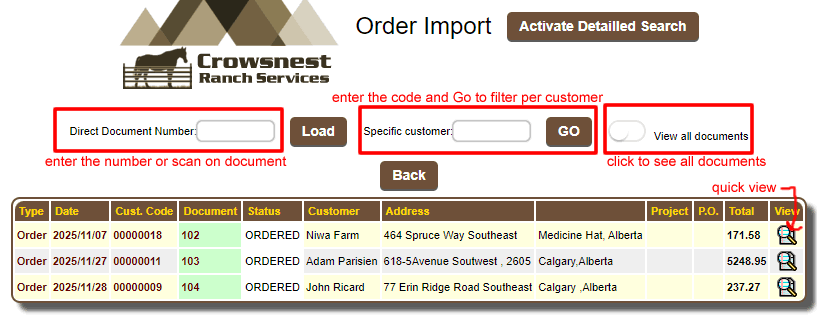
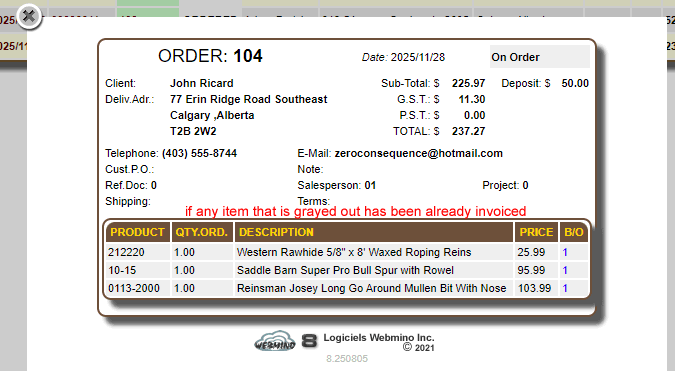
You can view the order in the search window without importing it by clicking 
You can import a document into another document, e.g., a quote into one order, an order into another order, or a quote into another quote.
Apart from invoices, these documents are not subject to the same rules.
The document will be imported into an INVOICE according to the following rules:
- For an ORDER, items that are not invoiced or are on backorder (B/O) will be imported.
- If the DISTRIBUTION QUANTITY CONTROL option in the operational behavior is active, only B/O items with a physical quantity available will be imported.
- Comments and notes are exempt from these rules.
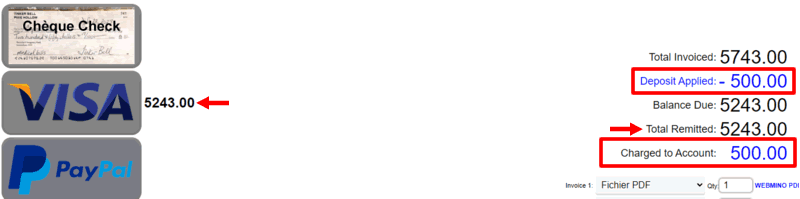
If a deposit exists for this order, a deposit List section will appear on the customer page, allowing you to view the received deposits.
If a deposit exists, it will be visible and automatically applied to the payment page.
|
|