WEBMINO Manual
Support: (403) 909-6517 or (514) 617-7817
System What's New ADMINO+/WEBMINO Portal ADMINO+ account menu Company menu Search
Tips and Work Techniques
Accounting Startup Initial Configuration Online Customer Services Rental System Billing and closing Add inventory Record stock losses Follow up with your customers/representatives Prepare and ship SERVICE+ options Mini assembly production Manufacturing production Production Batches Import-Export Chains
Administrative Options
Account Subscription Appearance Profiles Users Companies Import-Export
System Settings
General Information Main Menu Appearance Profiles Users Printers Import-Export Special Tools Subscription
Configurations

Administrative Settings
General Section
Company Settings Financial Settings Operational Behavior Counter Management Special Sale Options Point of Sale Financial Statements Warehouses Salespeople Projects Documents
Terminal Printing Emails and Text Messages Bulletin Board Exchange Rates
Categories Section
Inventory Cat. Customer Cat. Supplier Cat. Employee Cat. Routes Sorting Groups Sales Tracking Service Types Service Tracking Documents Service Forms
Salary Section
Templates Constants Federal tax Provincial tax Federal surtax Provincial Surtax Direct Deposit XML Statements
Special Tools
File Maintenance Specific Changes Payroll Tools Custom Forms
Special Modules
Specific Items in Batch Production Settings Syncro Inventory Syncro Customers
Transport Management
Route Management Truck Management Truck Schedule Planning Delivery Console
Customer Service Settings
General Settings Appearance Payments Shipping Home Page Promotions Page Service Page Terms Page Emails Activation
General Ledger Menu
Entries Charter of Accounts Reconciliation Transit Deposits Sales Taxes Payroll Remittances G/L Analysis and Verification G/L archives Budget Liquidity Analysis Daily Activities Quick Project Analysis
Periodic Closures
Fiscal Year Calendar Year Inventory Variation
Financial Statements
Trial Balance General Journal General Ledger Cash Receipts Cash Disbursements Income Statement Balance Sheet Project Analysis Results Analysis
Income Menu
Billing
Customer Accounts Cash Receipts Point of Sale Compact Point of Sale Closing Sales Cash Drawer Countertop Invoicing Customer Receipts Account Statements AR Analysis Invoice Printing Accounts Receivable Adjustments Invoice Tracking Open Invoice Tracking Selective Billing Order Tracking Quote Tracking Shipping Console Export Chains Consignments Consignment Tracking Billing Contracts Contract Billing Contract Tracking Pmt Request Tracking. Rental Console Quick Sales Search Mobile Invoicing Mobile Customers
Reports
Accounts Receivable Sales Orders Mail Merge Quotations Statistics Comparative Statistics Compound Statistics Global Sales Global Mail Merge
Expenses Menu
Purchases and Expenses Suppliers Payments Closing Purchases Employees Checks A.P. Analysis Payable Adjustments C.A.R.-C.A.P. Exchange Chain Tracking Import Chains Time Clock Control Attendance Time Clock Supervision
Payroll Processing
Payroll Preprocessing Payroll Processing Direct Deposit Payroll Cancellation Time Clock Transfer
Reports
Accounts Payable Purchases Payroll Records of Employment T4-R1 Forms Commissions Checks
Inventory Menu
Inventory Orders Inventory Verification Products to Order Inventory Changes Inventory Taking Inventory Processing Promotional Changes Product Creator Order Tracking Required Products Intra Branches Intra Reception Assembly Sold Products Analysis Inventory Movement Analysis Lot Analysis IN-OUT Inventory Quick Inventory Search
Reports
Inventory Purchase Orders Inventory Replacement Missing Quantities Assembly Composition
C.R.M./Service
Time Clock Events Today's Events Events to Watch Calendar Event Tracking Service Requests Work Orders Service Schedule Work Order Tracking Daily Route Sheet Customer Visit Tracking Customer Routes Document Bank Forms Management Complete the Forms Table of Forms
Reports
Service
Clinic/Appointments
Dashboard Appointments Monthly Schedule Weekly Schedule Daily Schedule Treatment Follow-up 6 Month Calendar Operation Setup Treatments Rooms
Production
Production Monitoring Production Items Specifications Put into Production Method Management Production Calendar Production Day Production Console Production Cost Variation Required Components Tracking Component Cost Variation Component Usage
Reports
Production Recipes


Sales Invoicing

Back to main page


Chapter 6    Importing an Order or Quote


To import an ORDER, a QUOTE, or a WORK ORDER, click the button.

This opens the document search, and you can use the tools to find the desired document.
If you know the order number directly, you can enter it or scan it in the Direct Document No. field.
Alternatively, click on the information in one of the four columns (type, date, customer code, document) from the left side of the table to select the document in question.
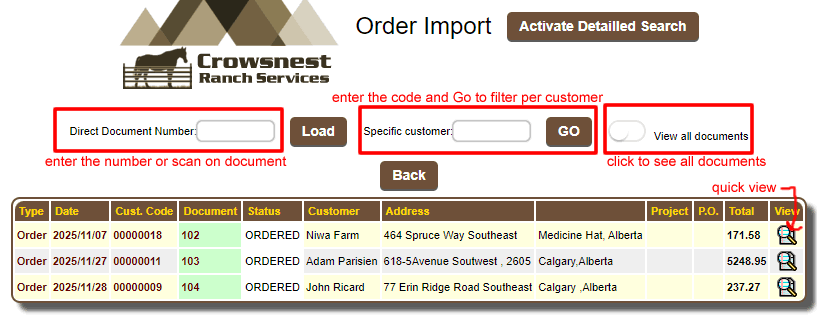


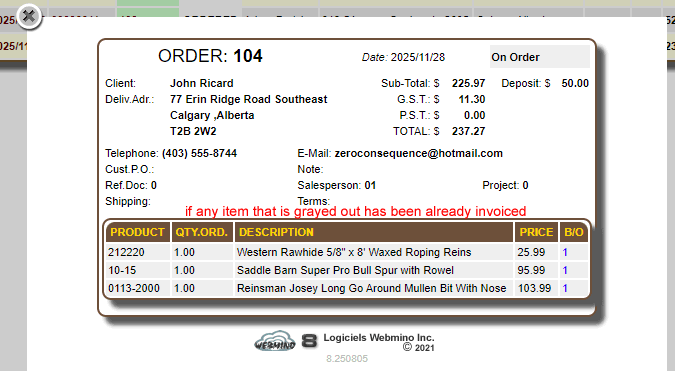
You can view the order in the search window without importing it by clicking


You can import a document into another document, e.g., a quote into one order, an order into another order, or a quote into another quote.
Apart from invoices, these documents are not subject to the same rules.

The document will be imported into an INVOICE according to the following rules:

- For an ORDER, items that are not invoiced or are on backorder (B/O) will be imported.
- If the DISTRIBUTION QUANTITY CONTROL option in the operational behavior is active, only B/O items with a physical quantity available will be imported.
- Comments and notes are exempt from these rules.

If a warehouse already exists, a "List of Warehouses" section will appear on the left, allowing you to view the warehouses received.


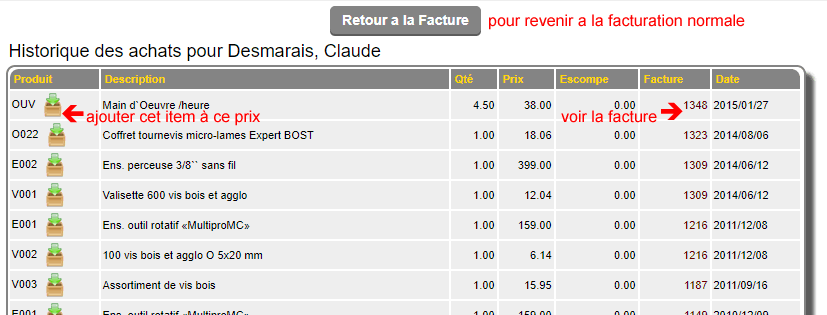
The PURCHASE HISTORY button allows you to switch the invoice to history mode (the items are replaced by a table of the last 500 purchases with the price and discount for this customer).
If the button is clicked, this item will be added to the invoice at the price paid in the history. The invoice can also be viewed by clicking the number. To return to the invoice, click the Return to Invoice button.